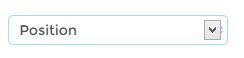
Trying to the hide the arrow on the select tag
I have been having problems trying to hide the default arrow icon on the
select tag
http://i255.photobucket.com/albums/hh140/testament1234/select_zpse4931c27.jpg
CSS -
.toolbar .sort-by select {
background:url('/skin/frontend/baby/default/images/select_icon.jpg');
background-repeat:no-repeat;
background-position:center right;
border-radius:5px;
border:1px solid #9edef1;
font-family:'montserratregular', sans-serif;
margin-left: 10px;
}
Regarding the image i have attached if you look at it closely there is a
small background icon behind the default arrow icon. Not sure why it is
not putting the background image on top of the default icon

No comments:
Post a Comment